

Vulnerability scanner for Joomla vulnerabilities
Scan a Joomla site online to check for known vulnerabilities in the CMS, including issues that can lead to password disclosure, remote code execution, privilege escalation, or unauthorized access.
Quick update: In October 2026, we retired the standalone Joomla Vulnerability Scanner. You can now use the Network Scanner instead, which already covers Joomla detections for vulnerabilities such as CVE-2023-23752 (password disclosure) and CVE-2026-48907 (unauthenticated remote code execution).
Unlock full capabilities
Monitor your assets for exposure to new, critical vulnerabilities with our full Continuous scanning & validation product.
Scan a Joomla site online to check for known vulnerabilities in the CMS, including issues that can lead to password disclosure, remote code execution, privilege escalation, or unauthorized access.
Quick update: In October 2026, we retired the standalone Joomla Vulnerability Scanner. You can now use the Network Scanner instead, which already covers Joomla detections for vulnerabilities such as CVE-2023-23752 (password disclosure) and CVE-2026-48907 (unauthenticated remote code execution).

What does a Joomla vulnerability scan check?
A Joomla vulnerability scan with our Network Scanner fingerprints the Joomla version and checks it against known vulnerabilities.
Often, the sites that need it the most are the ones nobody watches: old campaign sites, agency builds, and subsidiary sites that still run the version they launched with.


Why Joomla security matters: a medium score, a real exploit
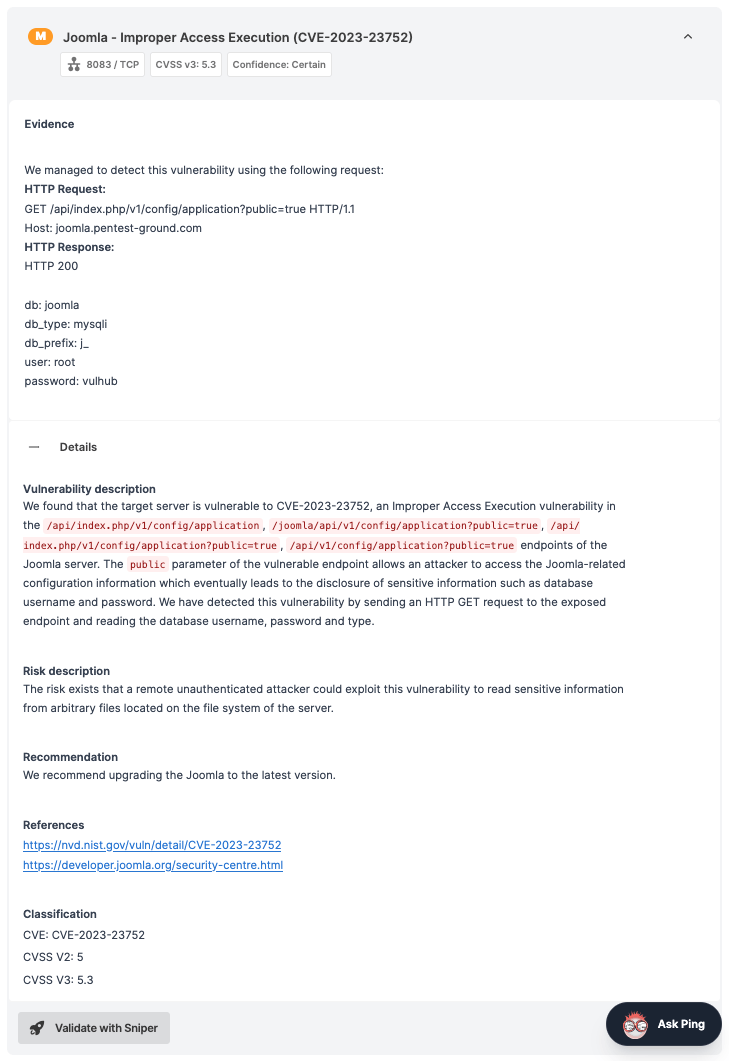
CVE-2023-23752 affects Joomla 4.0.0 through 4.2.7. An improper access check lets unauthenticated requests reach webservice endpoints that should have required a login, which can expose site configuration, including the database password.
Its CVSS v3.1 base score is 5.3, a medium rating. CISA still added it to the Known Exploited Vulnerabilities catalog on January 8, 2024 (NVD, Joomla security advisory).
A team that triaged by score alone would have scheduled it for later. A severity score tells you how bad a flaw could be. Exploitation evidence tells you if attackers already use it, and that's the signal to act on first.
Our Network Scanner detects CVE-2023-23752 and Joomla Sniper can confirm it with safe exploitation. See the password disclosure, improper access check, and exploitation entries in our Vulnerabilities & Exploits database.
How to scan Joomla with the Network Scanner
Our Network Scanner checks the hosts you give it, so the workflow starts with a list of your Joomla sites.
- Add each Joomla site as a Network Scanner target, as a hostname such as www.example.com. You can also import a list of hosts from the Assets page.
- Run a Deep scan, or a Custom scan with all engines enabled. Both include the Joomla checks.
- Schedule the scan to repeat, so new Joomla detections run against your sites as soon as they ship.
What the Network Scanner checks on Joomla
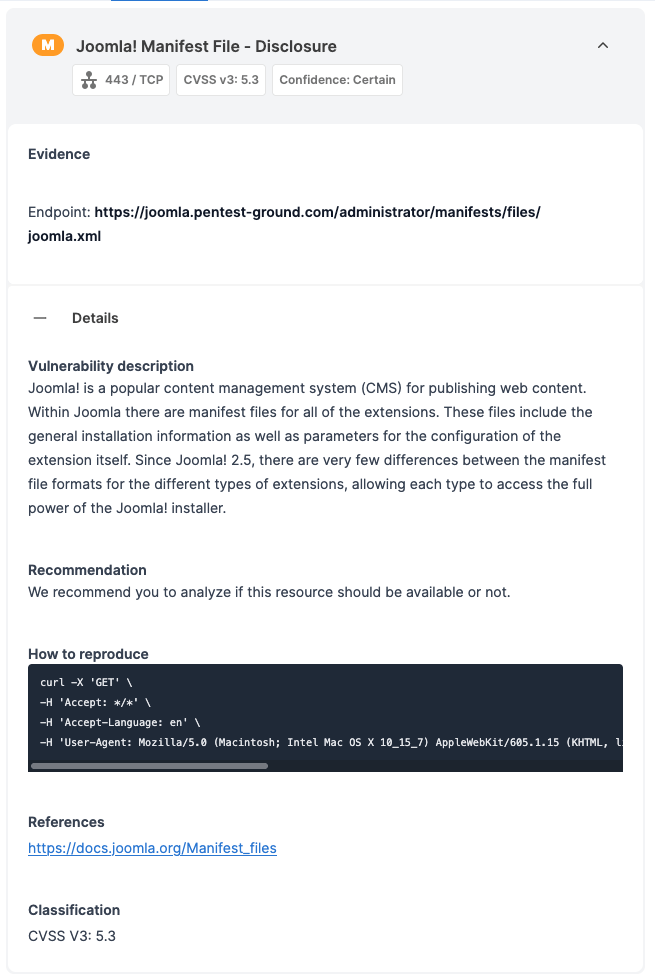
The core version, read from meta tags, JavaScript and CSS paths, and manifest files
Known vulnerabilities for that version, including CVE-2023-23752
The Joomla vulnerability detections run on all paid plans that include the Network Scanner.
How to fix Joomla vulnerabilities
Update the Joomla core to the latest release for your major version. If your major version no longer gets security updates, plan the upgrade.
Update every extension, and remove the ones nobody uses.
Retire or archive the sites nobody maintains.
Restrict access to /administrator where your setup allows it.
Re-scan to confirm the fix.



If you used the Joomla Scanner
Scheduled and API-triggered Joomla Scanner scans stopped in November 2026. Your past reports are still in your account. To keep covering the same sites, add them to a scheduled Network Scanner scan.

Joomla Scanner FAQs
Which Joomla versions does the Network Scanner cover?
The Network Scanner covers Joomla versions 1.5 through 6. That ensures coverage for current releases and the end-of-life versions that older sites still run.
Does it detect CVE-2023-23752?
Yes. See the password disclosure and improper access check entries for details.
Can I scan a Joomla site online for free?
No. Only paid plans give you access to the full Network Scanner capabilities, which include Joomla detections.
For free, you can check a site you own manually: the administrator dashboard shows the Joomla version, and the extension manager lists every installed extension. Compare both with the Joomla Security Centre and each extension vendor's advisories.
Does a vulnerability scan find malware on my Joomla site?
No. A vulnerability scan looks for weaknesses an attacker could use, such as an outdated version. Finding malware that's already on the server takes a file-level review of the site, its database, and its server logs.
If you suspect a compromise, investigate it first, then remediate any vulnerabilities or misconfigurations that contributed to it.
Is the scan safe for a live site?
The Joomla checks the Network Scanner runs include version detection, which only reads what the site already serves, and Joomla CVE and misconfiguration checks, which also include active requests.
We recommend scheduling scans outside peak hours if load matters, and, of course, to scan only sites you're authorized to test.
Where are my old Joomla Scanner reports?
In your account, under your past scans.

Check the whole site, not only the CMS
A Joomla install is one layer of a web app. The Network Scanner checks the CMS and the services around it. To test the app itself, run the Website Scanner: it crawls the site's pages, forms, and parameters for issues such as SQL injection and cross-site scripting, which a CMS version check won't reveal.
Both scanners are part of our Continuous scanning & validation product: continuous web, network, and cloud scanning with 17,400+ detections and exploit modules, safe exploitation where supported, and evidence captured with each finding.