

Subdomain takeover checker: find and fix dangling DNS records
Check if your subdomains still point to cloud services you stopped using, and identify dangling DNS records before someone else can claim the underlying resource.
Quick update: In October 2026, we retired the standalone Subdomain Takeover tool. You can now check for subdomain takeover risks with the Network Scanner plus 17,400+ other vulnerabilities across your internet-facing assets.
Unlock full capabilities
Monitor your assets for exposure to new, critical vulnerabilities with our full Continuous scanning & validation product.
Check if your subdomains still point to cloud services you stopped using, and identify dangling DNS records before someone else can claim the underlying resource.
Quick update: In October 2026, we retired the standalone Subdomain Takeover tool. You can now check for subdomain takeover risks with the Network Scanner plus 17,400+ other vulnerabilities across your internet-facing assets.

What is a subdomain takeover?
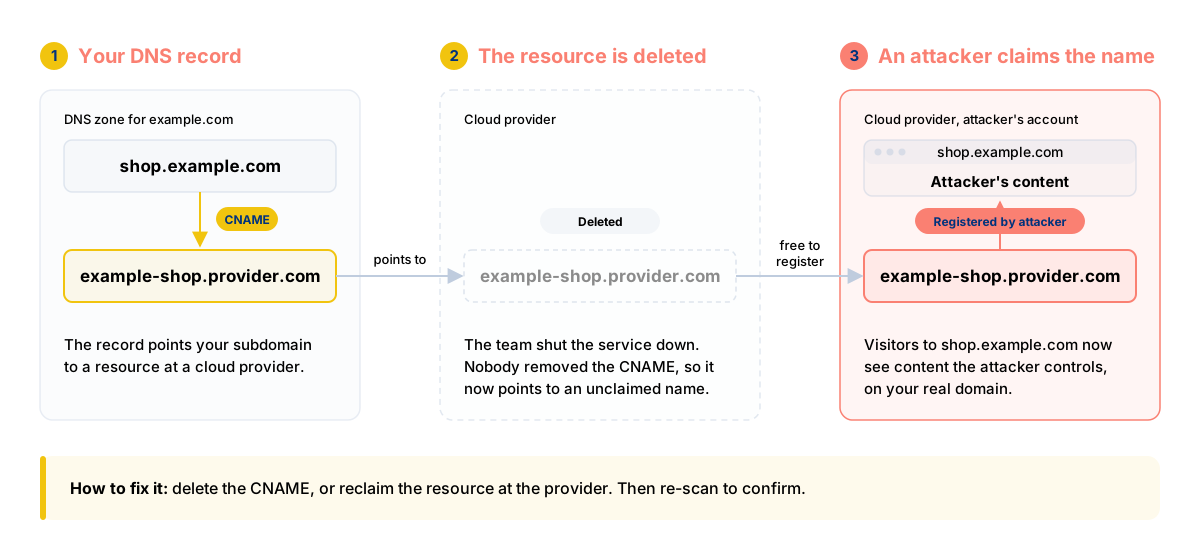
A subdomain takeover happens when a DNS record, usually a CNAME, still points one of your subdomains to an external service your organization no longer uses, such as a cloud storage bucket, a hosted app, or a code-hosting page.
If the provider allows someone else to claim that resource, an attacker may be able to serve their own content from your subdomain.
It usually starts with a routine shutdown. A team retires a marketing site or a test app and deletes the resource at the provider. The CNAME in your DNS zone stays, because a different team owns DNS and nobody added the record to the shutdown checklist.
DNS records outlive the services they point to. That's why a subdomain takeover is an inventory problem first and a vulnerability second.


Why subdomain takeovers matter
An attacker who controls content on your subdomain inherits the trust your domain carries.
Depending on your setup, that can mean:
- phishing pages on a real company domain, which pass the "check the URL" advice your users learned
- access to cookies scoped to the parent domain
- foothold in CORS, CSP, or OAuth redirect allowlists that trust *.example.com
Subdomain takeover is also a well-known bug class in bug bounty programs, which makes it worth checking proactively rather than waiting for someone else to report it.


How to check for subdomain takeover with the Network Scanner
Our Network Scanner checks the hostnames you give it. It doesn't discover subdomains on its own, so the workflow has two steps: find the hosts, then scan them.

Find your subdomains
Find your subdomains with the Subdomain Finder, or import a list of hosts from the Assets page.
Add them as targets
Add the subdomains as Network Scanner targets, as hostnames such as shop.example.com.

Run a Deep or Custom scan
Run a Deep or Custom scan with the Nuclei engine enabled. Depending on the takeover detection, Network Scanner checks DNS information and/or web responses for signatures that indicate an unclaimed resource.
Review the finding
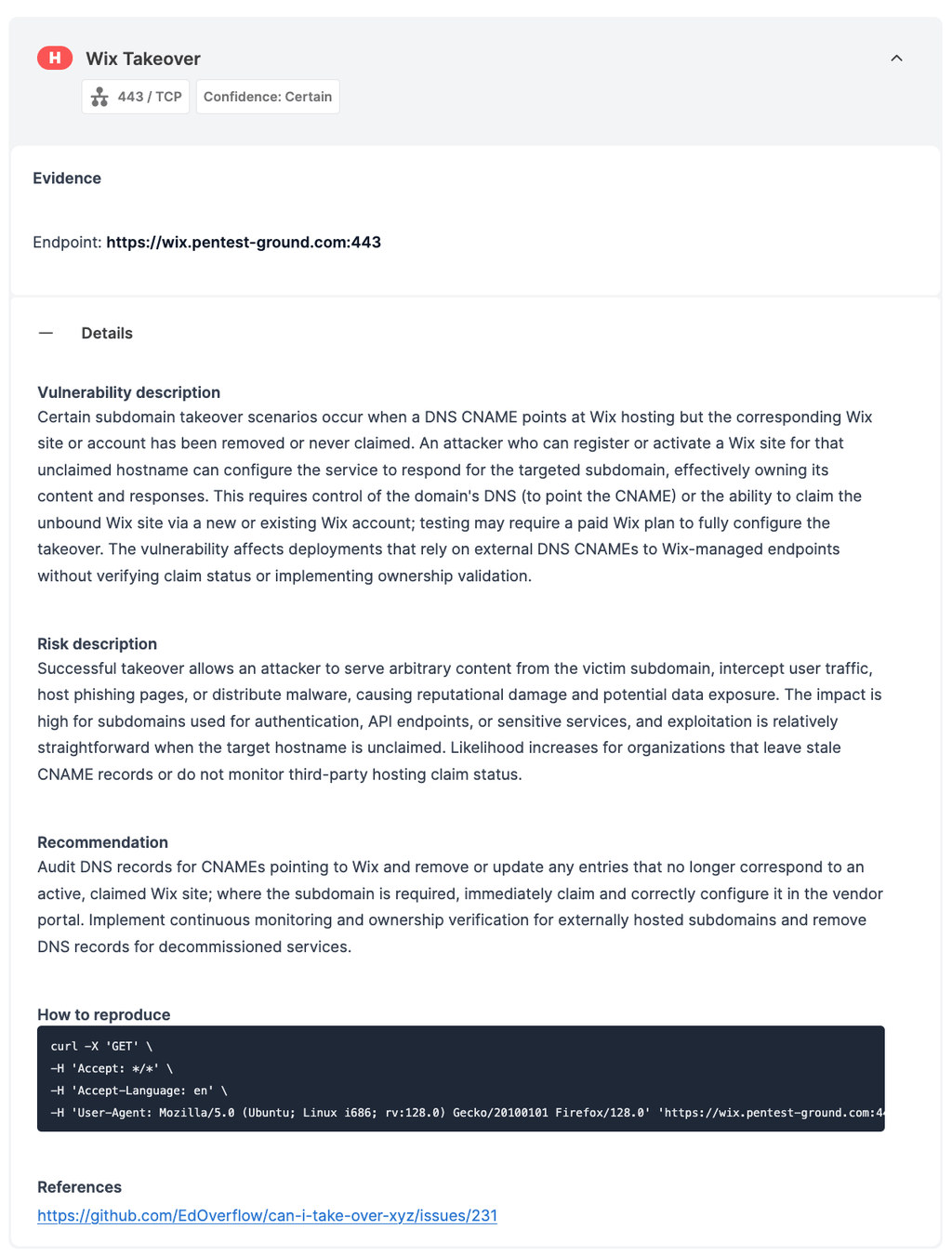
When Network Scanner detects a potential takeover, it generates a finding with evidence you can use to investigate and remediate the issue.
Schedule recurring scans
Schedule recurring scans so your subdomains are checked for takeover exposure over time, including after services are decommissioned.
The check only reads DNS records and web responses. It never registers or claims a resource. The subdomain takeover detection runs on all paid plans which include the Network Scanner.
Supported providers include GitHub Pages, Ghost, Bitbucket, Surge.sh, UserVoice, Help Scout, Helpjuice, ReadMe, JetBrains, and Tilda.
How to fix a subdomain takeover issue
Delete the DNS record if you no longer need the subdomain.
If you still need the subdomain, recreate and claim the resource at the provider, then confirm the content is yours.
Add "remove DNS records" to your decommissioning checklist, owned by whoever shuts the service down.
Re-scan to confirm the record is gone or resolves to a resource you control.



If you used the Subdomain Takeover tool
Scheduled and API-triggered Subdomain Takeover scans stopped in November 2026. Your existing Subdomain Takeover reports remain available in your account. To keep covering the same hosts, add them to a scheduled Network Scanner scan.

Subdomain takeover FAQs
Does the Network Scanner find my subdomains for me?
No. It scans the hosts you add. Use the Subdomain Finder to discover subdomains, or import a target list from the Assets page, then scan those hosts.
Which providers does the check cover?
Supported providers include GitHub Pages, Ghost, Bitbucket, Surge.sh, UserVoice, Help Scout, Helpjuice, ReadMe, JetBrains, and Tilda.
Can I check for subdomain takeover for free?
Yes, during the 7-day free trial. After the trial, subdomain takeover detection is available on all paid plans that include the Network Scanner.
For free, you can find your subdomains with the Subdomain Finder free scan and check them by hand.
Is every dangling CNAME exploitable?
No. Some providers verify domain ownership before they assign a resource, so the record is untidy but can't be taken over.
Remove stale records even when they aren’t currently claimable, since provider behavior can change.
Is the subdomain takeover check safe to run against production?
Yes. The subdomain takeover check is read-only: it inspects DNS information and web responses without registering or claiming the underlying resource.
However, we always recommend you scan only domains you're authorized to test.
Where are my old Subdomain Takeover reports?
In your account, under your past scans.

Check more than one exposure at a time
A dangling DNS record is one exposure across your internet-facing assets. The Network Scanner lets you check the same hosts for subdomain takeover alongside 17,400+ other network vulnerabilities and exposures, with safe exploitation where supported, and evidence captured with each finding.
Schedule recurring scans to keep checking those assets as infrastructure changes and services are decommissioned.
Network scanning and vulnerability monitoring are part of our Continuous scanning & validation product, whose full capabilities you can test right now.