

Scan management: smarter scans, proven progress
Automate recurring scans, track what’s changed, and export evidence your clients and auditors can trust.
Bulk-scan multiple technology layers in one click, automatically diff findings across scans, and get reports straight to your inbox.
See how scan management in Pentest-Tools.com can help your team and your workflow.

Why traditional scanners slow security teams down
Security professionals don’t ask for much from vulnerability scanners.
They want to run the right scans on the right cadence, at scale. They want to see vulnerability scan diffs – proof of what’s new, fixed, or regressed since the last run. And they need to export those results cleanly into client or compliance systems without spending hours on formatting.
The wrong tooling can make that a frustrating task.
Point-in-time results make it hard to prove real progress.
Some scanners freeze removed assets for days, blocking retests entirely.
Report generators in other scanners rarely fit service workflows, meaning teams have to pull raw findings into their own templates.
These issues force workarounds that slow teams down and result in noisy reports that fail to satisfy auditors or executives. And, without evidence linked to GRC systems like Vanta, even solid work looks incomplete. There’s a better way.
How our scan management streamlines your workflow
Scheduling that runs itself

Schedule any scan to run on your cadence
Once, daily, weekly, monthly, quarterly, or yearly. Scans run automatically, the system keeps a complete history of every run, and you can edit or stop schedules anytime without losing results.

We’ve designed scheduling to meet the practitioner’s reality
Granular repeats combined with scan depth and configuration controls let you fine-tune cadence per asset, engagement, or compliance workflow.
Scan depth and execution control
Not every scan needs the same level of depth. Pentest-Tools.com supports three scan types for the tools that allow it:
Light scans for fast, surface-level coverage when speed matters.
Deep scans for full assessments and compliance-grade coverage.
Custom scans when you need precision - selecting exactly what to test, how aggressively, and for how long.
Custom scans give you execution-level control, not just coverage. You can cap scan time, adjust scope, and fine-tune execution so scans fit production constraints or maintenance windows, without breaking scan consistency between runs.
For supported network scans, target one or more specific CVEs to validate exposure to newly disclosed or high-risk vulnerabilities across large environments in minutes. Narrowing the scope helps you balance speed, coverage, and impact per asset, instead of running the same heavyweight scan everywhere.
Bulk scanning for zero days and retests
When new vulnerabilities surface or retests need to happen fast, bulk scanning handles it in a single action.
Launch multiple scans at once across in-scope domains or IPs, with your plan’s asset and scan limits determining scan volume and concurrency, so you can monitor vulnerabilities across your entire environment.
You can create scan groups for scanning multiple assets, get notified when all scans are complete, and get a single aggregated report - not a mess of disparate findings.
Scanned assets reset automatically at the start of each monthly scan cycle, regardless of scan type. At each reset, your asset count returns to zero and your full allowance is restored, allowing consultancies to manage client scopes freely without running into license locks or idle assets.
You can add unlimited assets and only designate what you need for in-depth evaluation - we call them scanned assets. You can test a scanned asset as many times as you want - without limits.
Tool-specific scan controls
Scan management isn’t just about when scans run - it’s also about how they run.
These tool controls keep your scans fast, relevant, and aligned with real-world threat models.
Verify whether a host responds before you scan it (check alive)
Choose which ports or port ranges you scan
Run scans with or without authentication
Scan targets from an external or internal (VPN-based) perspective
Diffs that show changes, not just lists of issues
How security teams use scan management

MSPs, MSSPs, and security consultants
Pentest-Tools.com fits the ways service providers and security consultants really operate – fast-moving projects, rotating client scopes, and constant retests. Instead of fighting asset locks or juggling client spreadsheets, they can:
Reuse recurring scan schedules across multiple clients.
Run lighter scans frequently and deeper scans when audits or validations require it.
Launch bulk rechecks immediately after new CVEs or patch deployments.
Export branded reports straight into client ticketing systems.
Because asset quotas reset at the start of each monthly scan cycle, service providers and consultants can move freely without license lockups. That means faster retests, zero admin drag, and client reports that show verified progress, not just lists of issues.

Internal security teams
Internal security teams use scan management to keep compliance, patch validation, and visibility under control – all without adding tools or manual steps.
Instead of scheduling scans from spreadsheets, managing cron wrappers, or writing scripts to keep recurring jobs alive, they can:
Automate recurring scans tied to SOC 2 or ISO windows.
Instantly re-scan critical systems or target a single CVE to confirm exposure when a new zero-day hits.
Feed verified findings into Vanta and other tools for automatic evidence collection.
Track real progress with diffs that show what’s fixed or regressed since the last run.
Everything runs on schedule, exports cleanly, and keeps compliance teams audit-ready without anyone chasing screenshots or timestamps.
What our customers are saying
Pentest-Tools.com provide multiple benefits, from identifying risks to delivering an effective recommendation on countering these risks. Pentest-Tools.com has a feature that allows you to schedule scans on your targets. This helps to scan and generate reports for you continuously. The notifications are also a great way to ensure that no reports go unnoticed. Very fast support if required.
Llee Tossel
DevOps Engineer


Take control of your testing cycle today
Ready to simplify your vulnerability scanning workflow? Run smarter scans, prove security faster, and stay audit-ready – without the busywork.
Scan management FAQs
Which scans can I schedule, and what cadences are supported?
You can schedule any scan to run once or on a recurring cadence: daily, weekly, monthly, quarterly, or yearly.
Can I schedule authenticated scans safely?
Yes, you can schedule authenticated scans for most web app authentication methods. We store your credentials or session data exclusively for their associated scheduled jobs and never share them across other scans..
However, there are a few technical nuances to keep in mind:
Best for persistence: Methods like Login Form and Recorded Auth work best for scheduling as they re-authenticate automatically during each run.
Session expiry: If you use Headers or Cookies for authentication, the scan may fail if the tokens or sessions expire before the next scheduled run.
Data integrity: You can update the scan frequency and notification settings at any time without losing your scan history or previous results.
Note: Because scheduled scans rarely rely on specific configurations, you cannot currently swap web app authentication methods (e.g., changing from Cookie to Login Form) or update passwords within an existing scan schedule. To update credentials, we recommend creating a new scheduled scan.
How does bulk scanning work for large target sets or zero-day rechecks?
Bulk scanning lets you launch hundreds of scans in one action. The scan group notifies you when all scans are complete and provides a single aggregated report.
What do “diffs” show between scheduled runs?
Diffs compare each scan to the previous one, showing exactly what’s new, fixed, or regressed. They use identical parameters for accuracy, so progress is measurable and defensible.
How do I export results or plug them into my pipeline?
Export audit-ready DOCX reports for remediation, or structured CSV and JSON for downstream analysis. You can also deliver findings directly via the API, enabling teams to feed results into existing reporting templates, dashboards, or risk tracking systems without manual reformatting.
How does the Vanta integration work for scheduled scans?
What counts as an “asset,” and can I rotate assets month to month?
An asset is the network host being scanned (e.g. hostname, IP address). Scanned assets reset at the start of each monthly scan cycle, so you can rotate targets freely across clients or environments.
How many scans run in parallel, and how are queues handled?
Your scanned asset quote determines how many scans you can run in parallel. You can start scans for all your assets at any time. Pentest-Tools.com runs scans in parallel up to your asset-based limit and automatically queues any additional scans, starting them as soon as capacity becomes available.
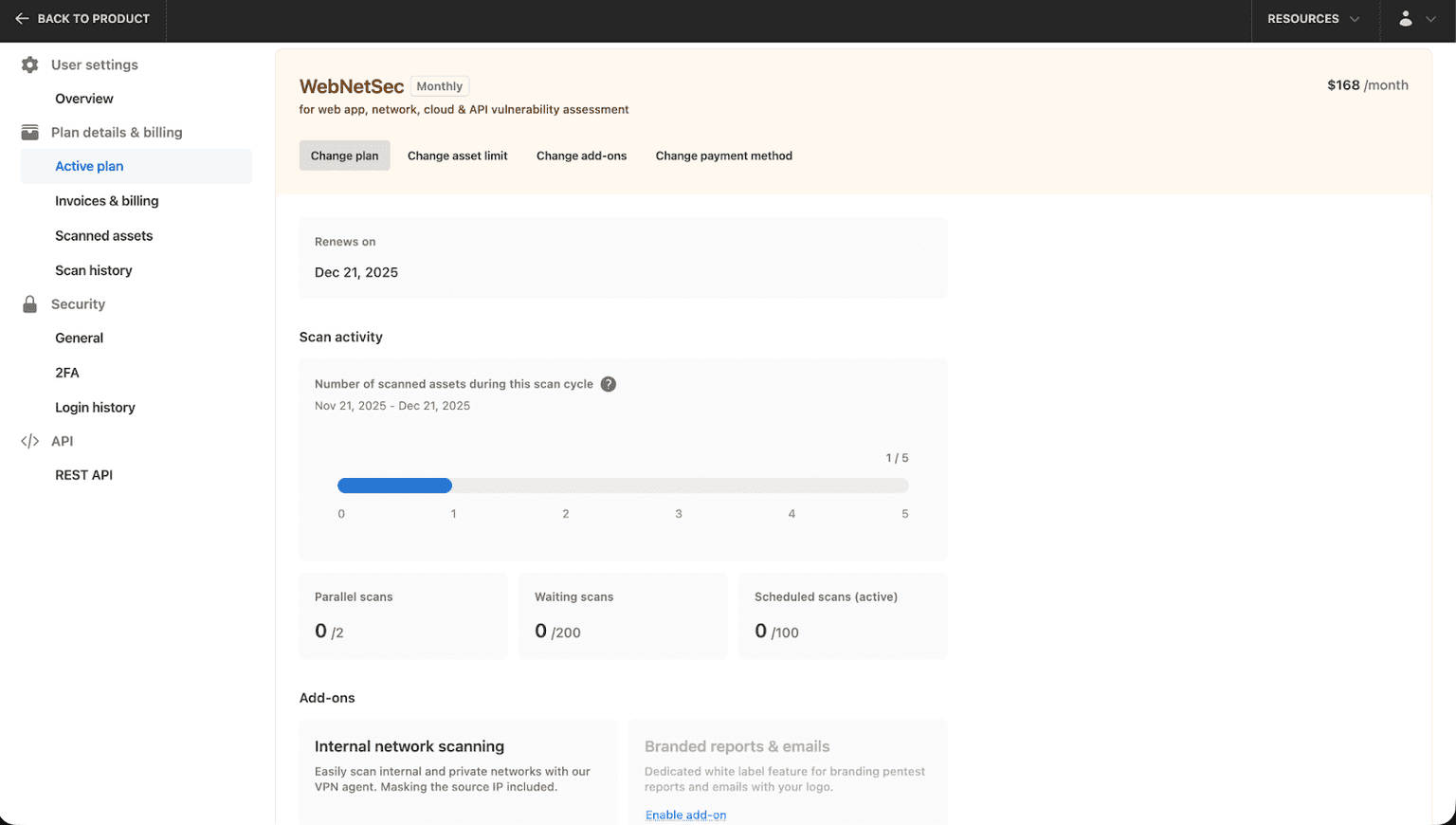
Where can I see how many scans or targets my plan includes?
When logged in, go to “My Account” – Plan details and you will see all your plan details: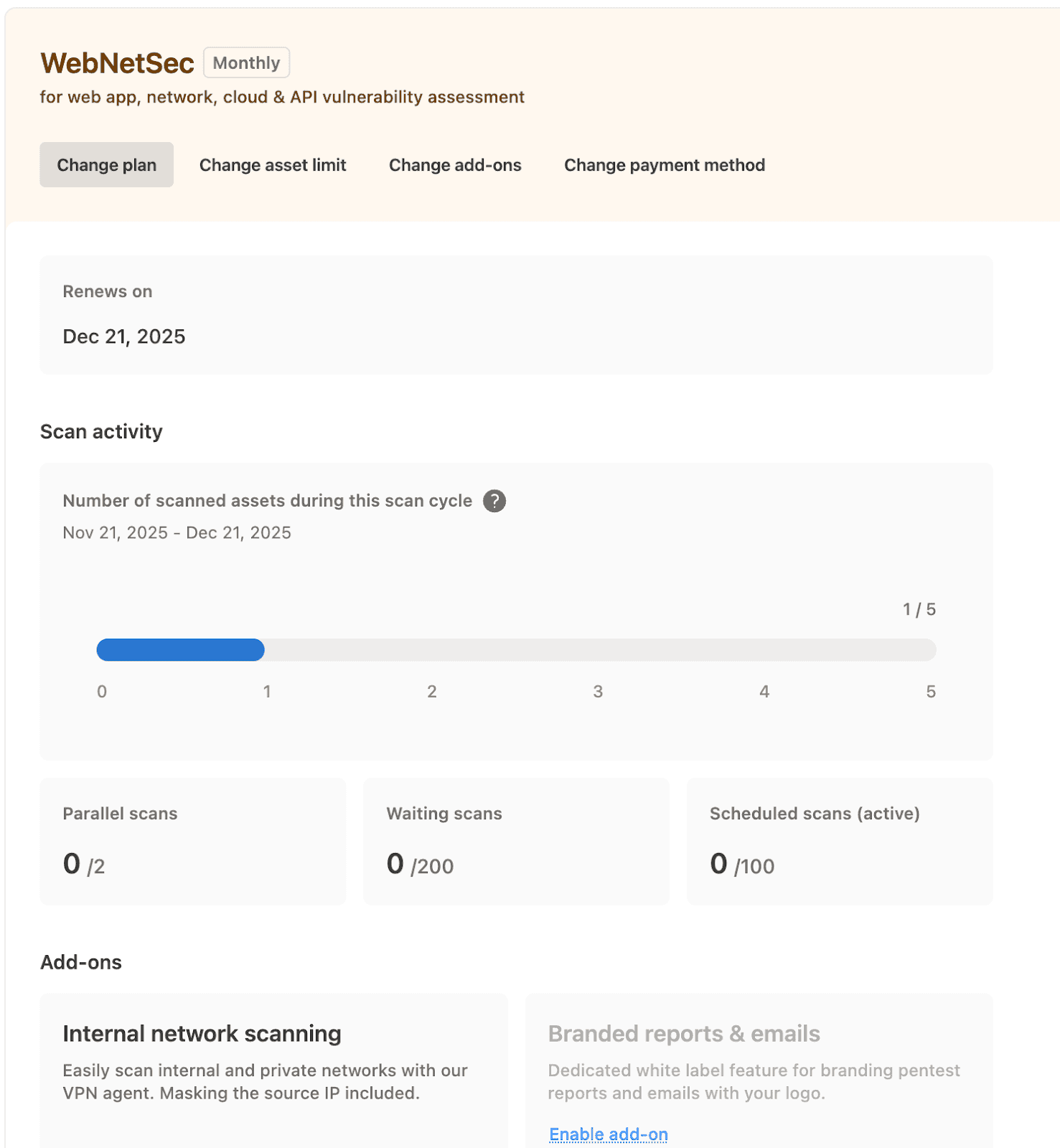
What notifications can I get from scheduled scans?
You can set email and dashboard alerts for completed, failed, or pending scans. Notifications can include scan summaries and direct links to reports or exports. You can connect notifications with other services - like Slack, Teams, or Discord - to get notifications directly in your day-to-day workflow.
Can I edit or pause schedules once they’re active?
You can stop any scheduled scan at any time, but if you want to run the scan again, it will run from scratch.