Changelog

These are the latest updates we've made to our platform. If you have any questions about any of the updates you see below, please feel free to contact us!

June 2025

  1. Cut through the noise with ML-powered false positive filtering

    Copy link to “Cut through the noise with ML-powered false positive filtering”

    False positives don’t just waste time - they erode trust, delay remediation, and bury real issues under a pile of noise.

    That’s why we’ve built and integrated the Machine Learning classifier - a purpose-trained machine learning model - directly into our Website Scanner and URL Fuzzer.

    Instead of relying on brittle RegEx logic, the ML Classifier analyzes every HTML response during a scan and automatically sorts it into one of four smart categories:

    📌 HIT – High-value targets like login pages, exposed secrets, and backups

    📌 MISS – Confirmed dead ends, even when status codes are misleading

    📌 PARTIAL HIT – Ambiguous but interesting results (like firewall pages or redirects)

    📌 INCONCLUSIVE – Requires browser-based rendering for confirmation

    This means you can quickly focus on what matters, reduce triage time, and get clearer, cleaner results.

  2. NEW: Pentest-Tools.com x Nucleus Security for smoother findings management

    Copy link to “NEW: Pentest-Tools.com x Nucleus Security for smoother findings management”

    You can now push vulnerability scan results from Pentest-Tools.com into your Nucleus workspace. Choose to automate based on conditions, or manually send only the Findings you need. No more custom scripts. No more manual data wrangling. One single source of truth for smoother findings management.

    ▶️ Watch this demo with our product manager, Dragos and:

    New in Pentest-Tools.com: Nucleus Security integration

    ✅ Control what gets sent and where
    ✅ Keep client data cleanly separated
    ✅ Centralize your vuln management in Nucleus

  3. Get more context with enriched JSON reports

    Copy link to “Get more context with enriched JSON reports”

    Every JSON report you generate from Pentest-Tools.com now includes scan metadata - including the target, scan type, and timing details.

    Perfect for consultants automating reporting workflows or teams feeding results into SIEMs, dashboards, or custom pipelines.

  4. Prioritize smarter with EPSS & CISA KEV

    Copy link to “Prioritize smarter with EPSS & CISA KEV”

    We’ve added EPSS scores & percentiles, and CISA KEV flags for the Network Scanner’s findings so you identify what’s critical, faster:

    • EPSS (Exploit Prediction Scoring System) helps you estimate the real-world likelihood of exploitation

    • CISA KEV (Known Exploited Vulnerabilities) flags confirmed threats

    You’ll now see this data in the classification section of each network scan finding.

    Whether you’re triaging results internally or reporting to clients, this adds vital context for a more accurate prioritization.

    Complement it with our case against single-metric risk models.

May 2025

  1. Deeper findings with Website Scanner upgrades

    Copy link to “Deeper findings with Website Scanner upgrades”

    We’ve made several key improvements to our proprietary Website Scanner to help you uncover more vulnerabilities - with greater precision:

    ✅ Light scans now include all passive detections so you get richer results with a quick scan
    ✅ GraphQL endpoint fuzzing now included to automatically identify GraphQL endpoints and test them as injection points
    ✅ Response Header Injection detection is still live in the active module since last month, but too useful not to mention again!

  2. Sniper: Auto-Exploiter, our proprietary offensive solution, now validates exploitability for CVE-2024-56145 (CVSSv3 9.8), a critical Remote Code Execution vulnerability in Craft CMS.

    Just like the rest of our exploit modules, this lets you:

    • Get proof of exploitation within minutes and skip manual PoC building

    • Strengthen your reports with screenshots and payload evidence

    As always, if Sniper can exploit it, our Network Scanner can detect it.

  3. Time matters - especially when a new critical CVE is looming over your infrastructures!

    That’s why the Network Vulnerability Scanner now automatically optimizes the engine selection when you scan for a specific CVE.

    This means:

    • We only enable the engines that can detect the targeted CVEs

    • Faster scan completion without losing detection depth

    • Quicker results your team can use to coordinate and patch

April 2025

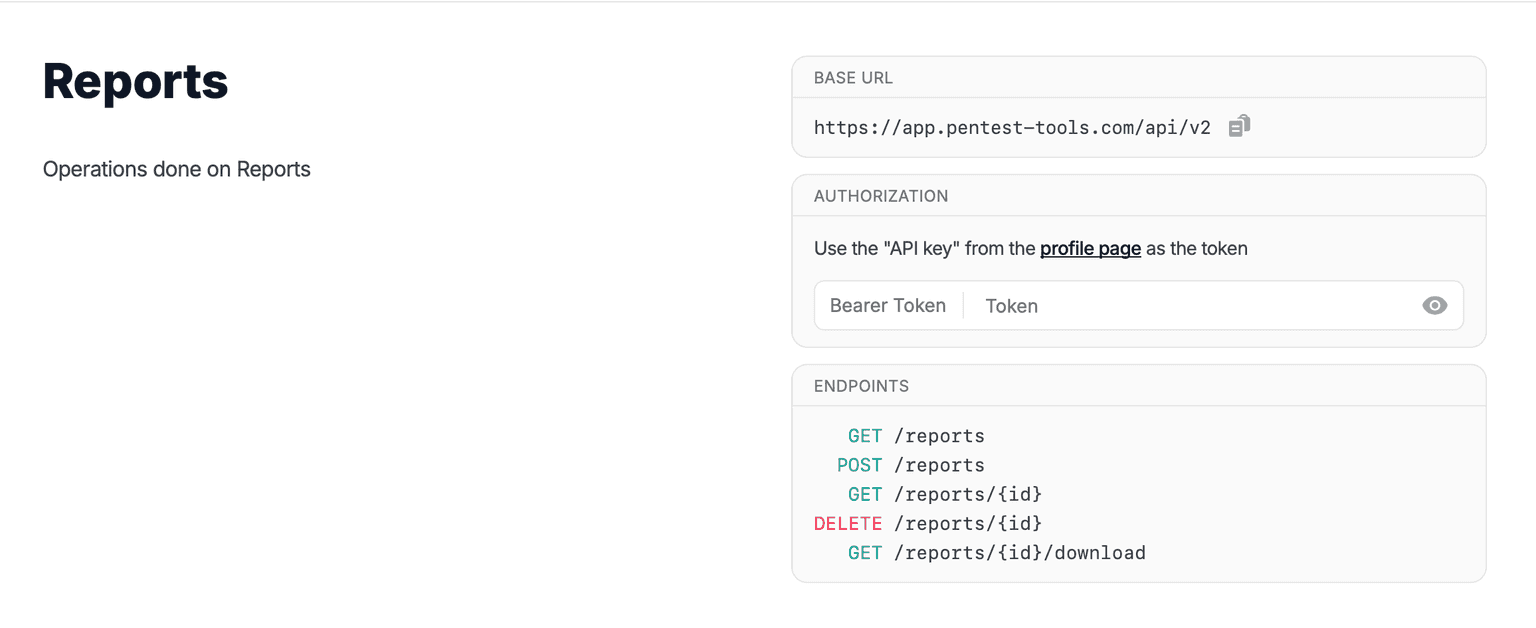
  1. Automate report generation with our new Reports API

    Copy link to “Automate report generation with our new Reports API”

    Generate, download, and view your reports via API — no more account login needed!

    We’ve made this update so you can integrate reporting into your automated workflows at scale:

    • Trigger the reports you need programmatically

    • Save time on repetitive manual tasks

    • Control what gets delivered and where

  2. Get richer findings with the Website Scanner

    Copy link to “Get richer findings with the Website Scanner”

    We’ve upgraded our proprietary Website Scanner to give you better visibility and deeper coverage of your apps:

    • Findings now include port, service, and protocol data

    • The scanner’s Active module now detects Response Header Injection, a commonly missed attack vector in real-world apps

    Whether you're auditing a third-party web app or scanning production assets, these updates give you faster, more precise insights.

  3. Start Pentest Robot scans directly from the New Scan flow

    Copy link to “Start Pentest Robot scans directly from the New Scan flow”

    Pentest Robots make it easier to:

    • Set up repeatable testing flows across clients with predefined or custom Robots

    • Run scheduled assessment sequences on internal assets

    • Deliver consistent, scalable testing with less effort

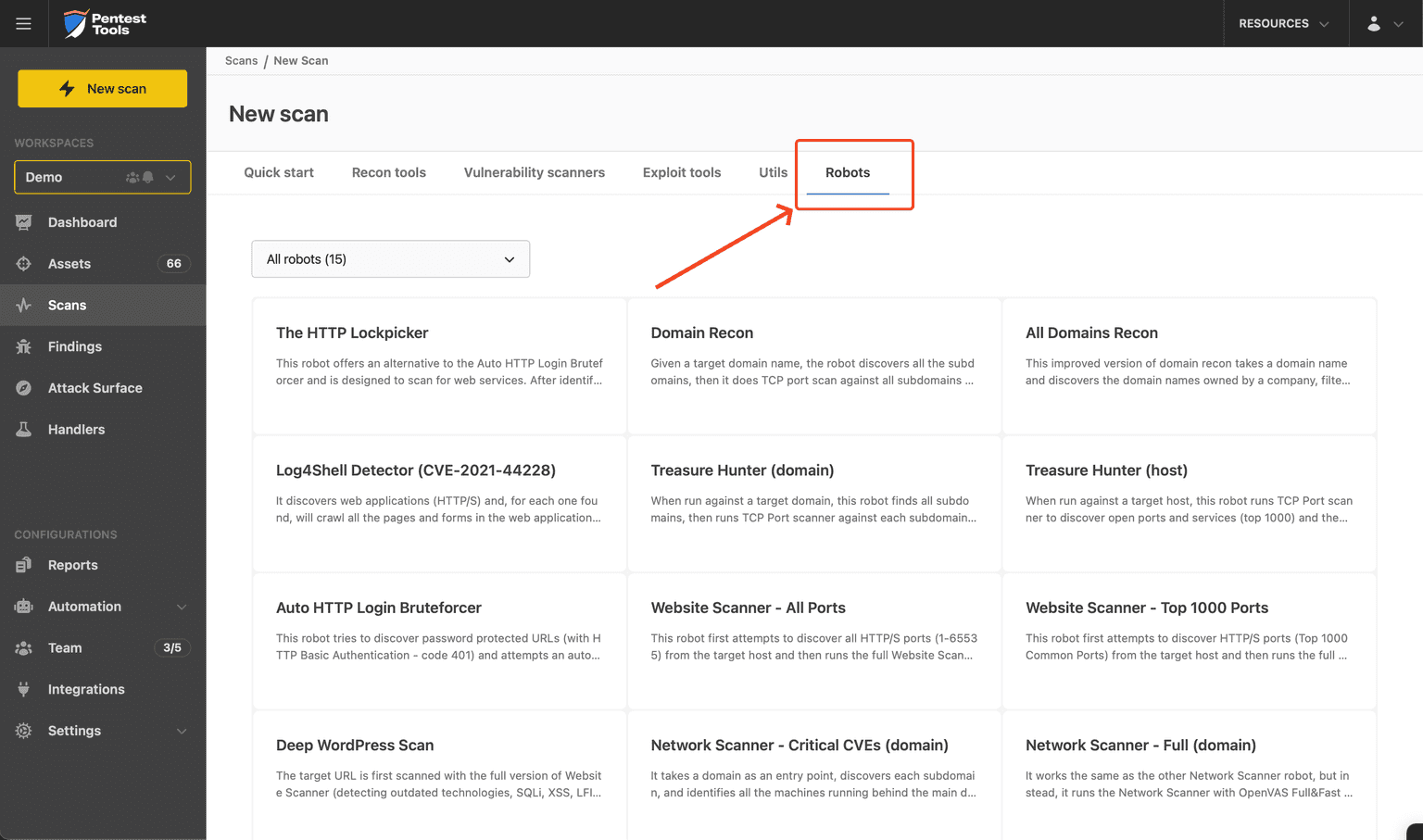
    You can now launch a Pentest Robot from the New Scan button, thanks to the new dedicated Robots tab — making your workflows even faster.

  4. The Subdomain Finder now integrates getallurls (GAU) in the External APIs test, pulling in subdomain data from archived URLs and Wayback content.

    This adds another layer to your discovery workflows, especially valuable for:

    ✅ Early-stage engagement scoping

    ✅ In-depth attack surface mapping

    ✅ Historical asset continuous monitoring with scheduled scans

  5. SonicWall’s Secure Mobile Access 1000 Series has a newly disclosed RCE — CVE-2025-23006 (CVSSv3 9.8) that allows an unauthenticated attacker to run arbitrary code on the target.

    Our Network Vulnerability Scanner can now specifically target and detect this CVE, so you can:

    • Flag affected assets in external infrastructure reviews

    • Stay ahead of exposure with your continuous monitoring flows

    • Deliver remediation-ready reports for stakeholders

  6. Prove real-world risk with these 3 new exploits

    Copy link to “Prove real-world risk with these 3 new exploits”

    Sniper: Auto-Exploiter now supports three high-risk CVEs, helping you validate exploitability with just a few clicks — no manual scripting needed:

    ✅ CVE-2024-11635 (CVSSv3 9.8) – an RCE in WordPress File Upload plugin using the require-once PHP statement, with attacker controllable data as an argument.

    ✅ CVE-2025-0890 (CVSSv3 9.8) – insecure default credentials for the Telnet function in Zyxel devices allowing an attacker to fully compromise your server.

    ✅ CVE-2024-40891 (CVSSv3 8.8) – a post-authentication command injection vulnerability in Zyxel via Telnet.

    For consultants, this means stronger deliverables and faster turnaround. For internal teams, actionable exploitability validation without time-consuming setup.

    Bonus reminder: all these CVEs can be detected with our Network Scanner.

March 2025

  1. Detect CVE-2025-29927, the vulnerability in Next.js middleware, fast and effectively

    Copy link to “Detect CVE-2025-29927, the vulnerability in Next.js middleware, fast and effectively”

    Our Network Scanner now provides fast, reliable detection for the critical Next.js vulnerability, CVE-2025-29927, so you can quickly identify affected applications.

    We've streamlined the detection process to help you pinpoint and address this risk effectively.

    How it works:

    ✅ Run a CVE-focused network vulnerability scan against your Next.js applications.

    ✅ The scanner will automatically check for CVE-2025-29927, highlighting vulnerable instances.

    ✅ Get clear, actionable results to prioritize patching and mitigation.

    Dive deeper: understand and fix CVE-2025-29927

    For a comprehensive understanding of the CVE-2025-29927 vulnerability, its impact, and detailed remediation steps, read our in-depth article.

    This write-up includes:

    • A technical breakdown of the vulnerability.

    • Affected Next.js versions.

    • Practical exploitation scenarios.

    • Business impact examples.

    • Step-by-step mitigation guidance.

  2. Catch email leaks, DOM-based redirects & XSS with ease

    Copy link to “Catch email leaks, DOM-based redirects & XSS with ease”

    This month’s Website Scanner updates help you uncover hard-to-spot web app issues faster:

    📌 Redirects buried in JavaScript can slip past traditional scans. Now our scanner checks for DOM-based open redirects, giving you deeper visibility into vulnerable behavior inside the browser.

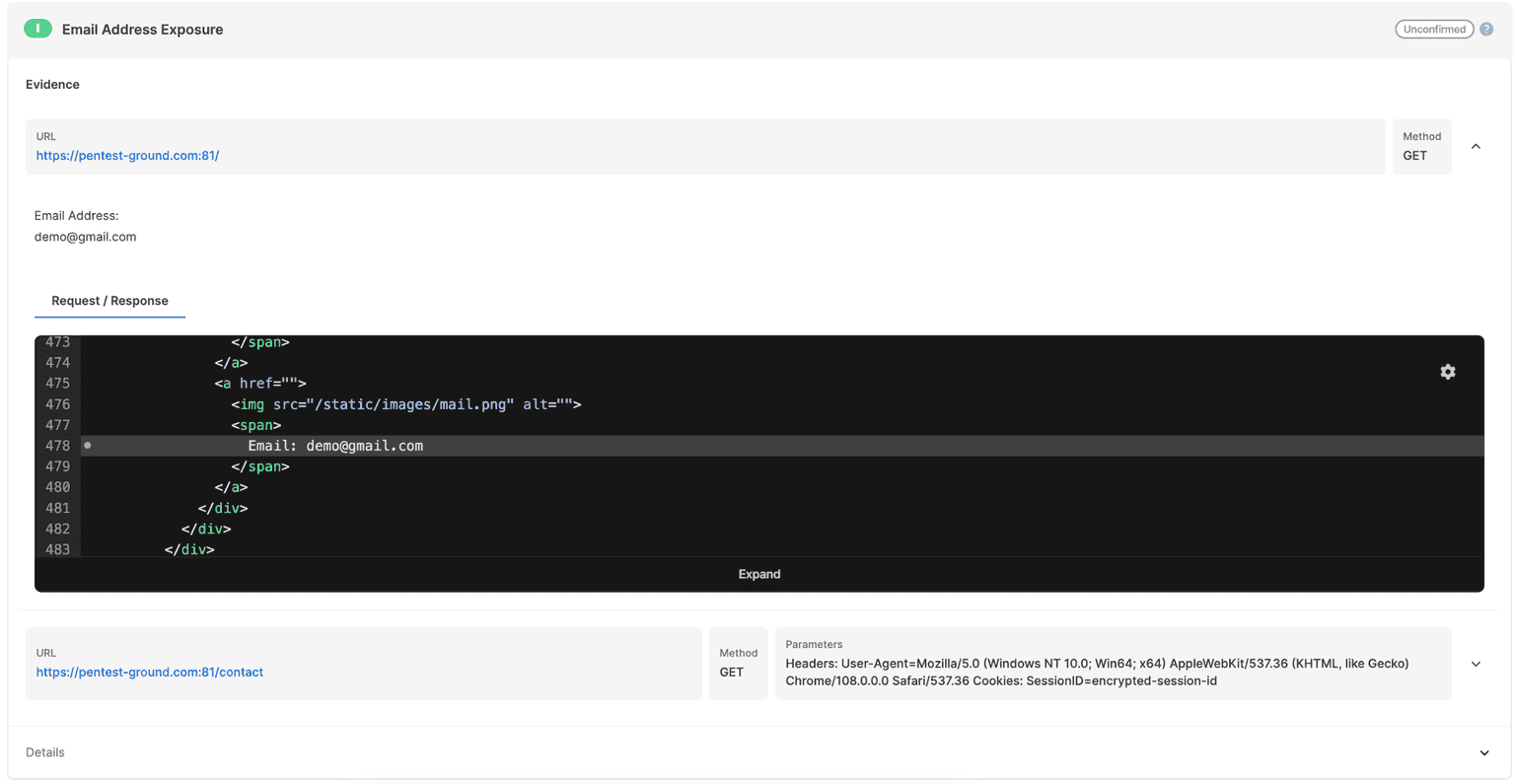
    📌 See emails as standalone findings for faster review and better reporting.

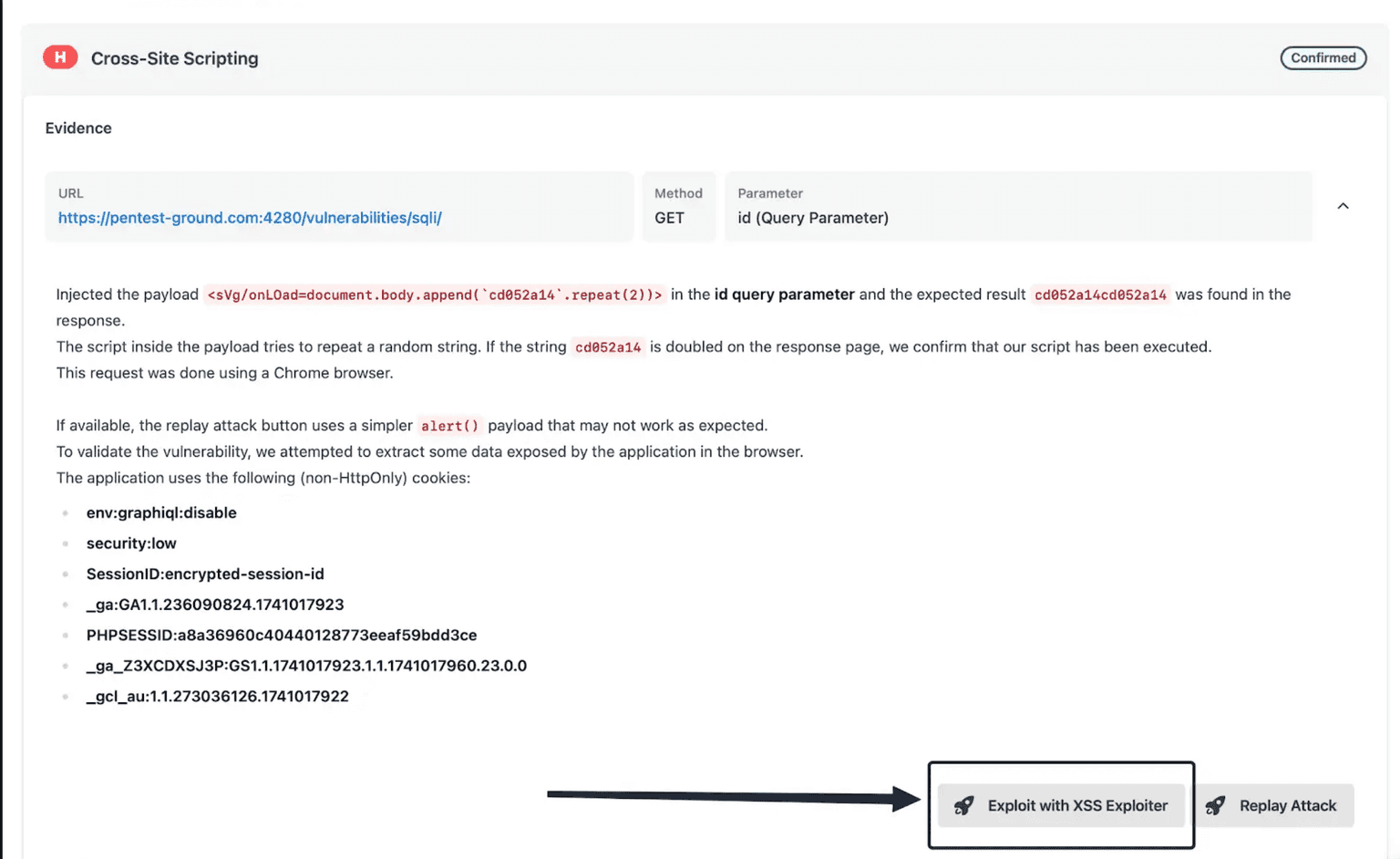
    📌 Found an XSS? No need to manually recreate your payload - just click “Exploit with XSS Exploiter” in the Website Scanner and capture screenshots, cookies, and request data every time it gets triggered.

  3. Edit scheduled scan notifications without starting over

    Copy link to “Edit scheduled scan notifications without starting over”

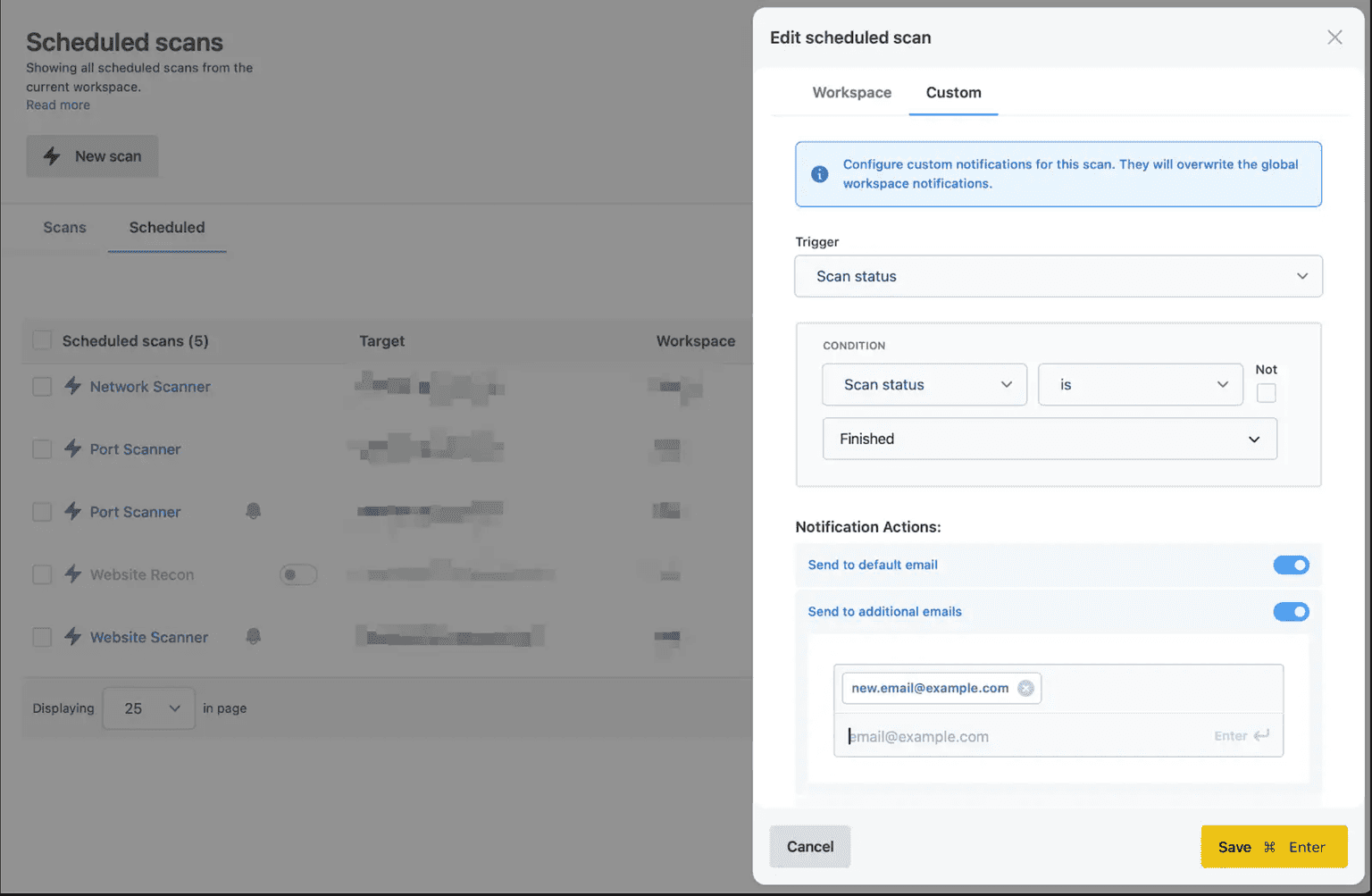
    Need to add a new teammate, client, or just more recipients to scan notifications or change your alerts settings? We heard you loud and clear!

    Now you can edit notification settings for Scheduled Scans without recreating them from scratch.

    ✅ Adjust on the fly
    ✅ Keep your workflow flexible