
Scan Robots: chain your testing. Keep the evidence.
Automate recon, vulnerability scans, and supported exploit checks through ready-to-use testing sequences. Choose the depth your target needs, then run it now or on a schedule.
The robot handles the tool handoffs and deterministic scan logic. Your team reviews the findings and decides what needs attention.


What are Scan Robots?
Scan Robots automate repeatable security testing workflows within Pentest-Tools.com’s Scanning & Validation product.
You choose the robot, target, and schedule. The robot runs a predefined set of tools, passes relevant results between them, and groups the scans into one run for your team to review.
Depending on the robot, the workflow covers discovery, port and service mapping, vulnerability scanning, credential checks, or supported exploit validation.
Your analysts can repeat these checks without rebuilding the sequence or managing each tool’s handoff, leaving more time to investigate findings and decide what needs fixing.

Keep testing between releases and assessments

Repeat the same tests on a schedule
Run the same workflow after a release, during a maintenance window, or on a recurring schedule. Give your team a consistent basis for reviewing results over time and support your compliance program.

Let one tool automatically feed the next
Each robot passes relevant results to the checks that follow, so teams don’t have to monitor scan completion, copy outputs, or launch the next tool.

See each security testing step as it runs
See which tools have finished, which are running, and what’s next without checking each scan separately. Review the scans together under one robot run, with findings in your existing list so your team can triage them alongside other testing results.

Get the same process from every analyst
Give analysts a repeatable workflow for each type of target, so the testing process doesn’t depend on who runs the checks. Spend less time coordinating testing steps and more time investigating findings that need human judgment.

Choose your Scan Robot by target and testing depth
Map exposure with recon, check for vulnerabilities with scanning, or add controlled exploitation for supported vulnerabilities across web apps, network, and cloud.
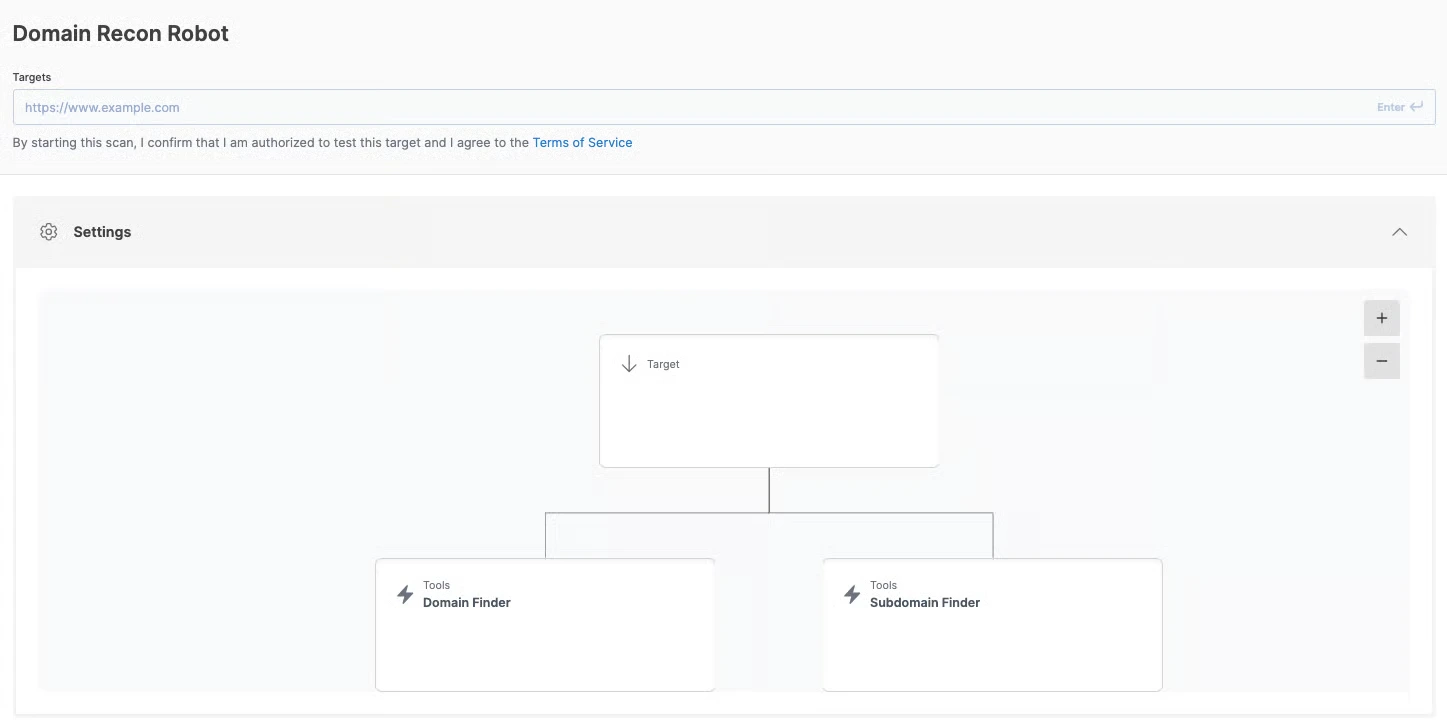
Domain Recon Robot
Objective: Recon | Target: Hostname
Find related domains and subdomains before you define the testing scope. Use the results to choose which hosts to assess when onboarding a client, starting an engagement, or reviewing newly discovered assets.
Host Recon Robot
Objective: Recon | Target: Hostname, IP address, or URL
See which ports are open, which websites share the host’s IP address, and which known CVEs match its service versions. Give your team an initial view of the host’s exposure before deciding what needs deeper testing.
The port scans check the 3,845 most common TCP ports and the 100 most common UDP ports. Version-based matches indicate potential exposure; they do not confirm exploitability.
App Recon Robot
Objective: Recon | Target: URL
Discover hidden files and directories, identify web technologies, and find publicly available email addresses and social profiles. Use the discovered paths and technologies to scope the next assessment.
Quick note: People Hunter collects only publicly available information.
Host Scan Robot
Objective: Vulnerability scan | Target: Hostname, IP address, or URL
Check a host’s network services, weak credentials, and discovered web services in one run. Schedule recurring checks on servers so your team can review network and web findings together without coordinating separate scans.
The port scans check the 3,845 most common TCP ports and the 100 most common UDP ports.
App Scan Robot
Objective: Vulnerability scan | Target: URL
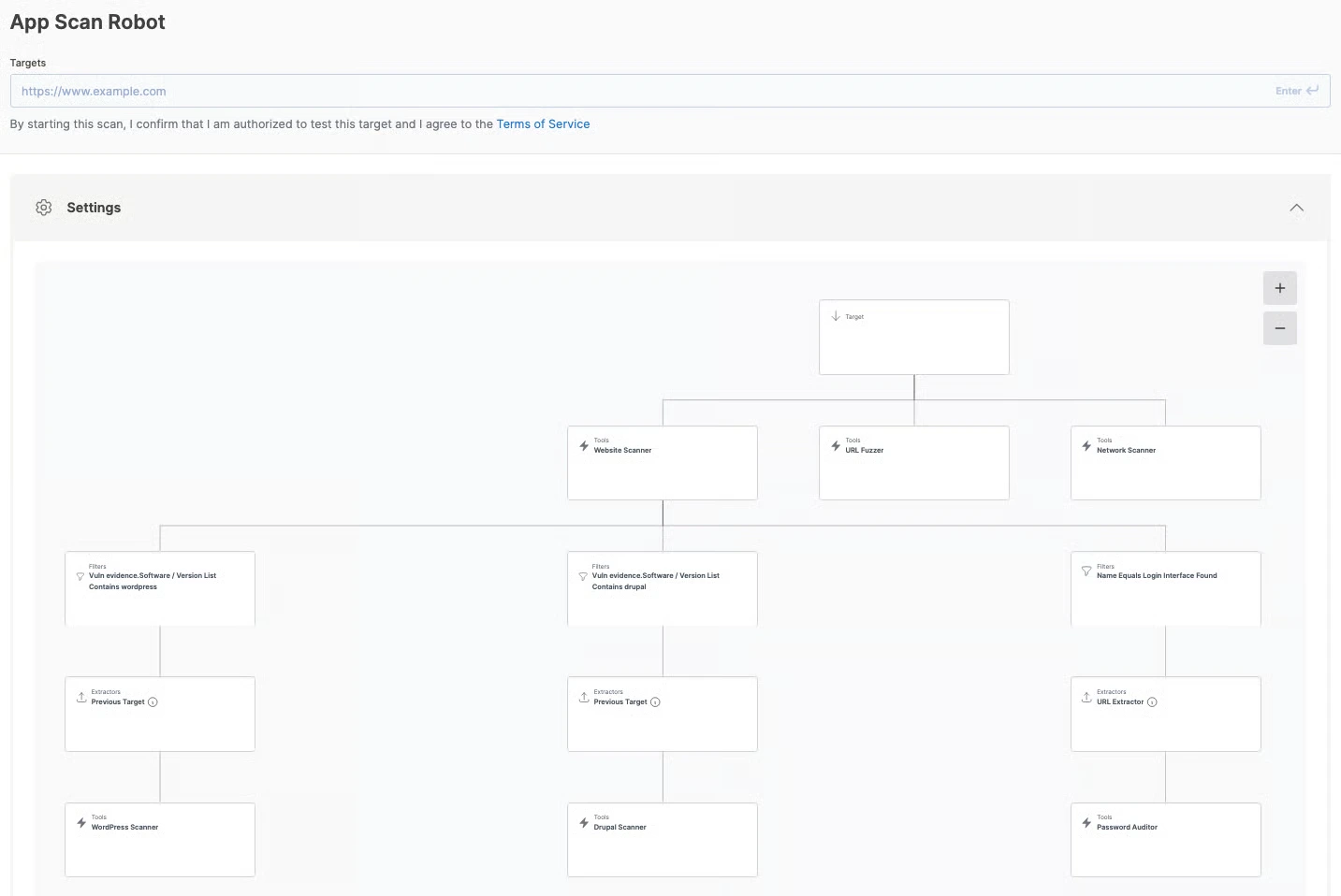
Scan a web app in depth (with WordPress or Drupal checks when relevant), with supporting checks for hidden paths, network vulnerabilities, and weak credentials. Run it before a release, after an application change, or on a schedule to give your team findings to investigate and remediate.
Host Scan & Exploit Robot
Objective: Vulnerability scan & exploitation | Target: Hostname, IP address, or URL
Follow the Host Scan workflow with controlled, manually tested exploitation of supported network-service CVEs. When an exploit succeeds, Sniper captures artifacts that demonstrate exploitability, giving your team concrete evidence for prioritization, remediation requests, and reports.

Discover assets. Choose what to test.
Each Scan Robot works on one target per run. When recon finds additional subdomains or virtual hosts, it lists them for review. Your team decides which ones to scan, keeping testing scope and scanned-asset use under your control.
To assess hosts across a domain:
1. Discover: Run Domain Recon Robot to find related domains and subdomains.
2. Review: Choose the hosts you have authorization to test.
3. Test: Run a host robot on each selected hostname, or an app robot on a specific web app URL.
A discovered hostname may point to a third-party service, such as a CDN or SaaS provider. Reviewing the results before scanning helps your team keep testing within the agreed scope.
Choose the testing depth your plan supports
Your account shows the robots your pricing plan includes. Start with discovery, then add vulnerability scanning or exploit validation according to the evidence you need.
| Testing depth | Included robots | Available on |
|---|---|---|
| Recon | Domain Recon, Host Recon, App Recon | Every paid plan |
| Scan | Host Scan, App Scan | AppScan and Exploit |
| Scan and exploit | Host Scan & Exploit | Exploit |
Not sure where to start? Run Domain Recon Robot on a domain you own, review what it discovers, and choose which hosts need deeper testing.
Start a run. Follow the checks. Review the evidence.
1. Choose your robot and target.
Open Robots and select the workflow for your testing depth. Enter the hostname, IP address, or URL it accepts.
2. Run it now or set a schedule.
Start an assessment on demand or schedule recurring checks. Follow the workflow view to see which tools have finished, which are running, and what’s next.
3. Review the results together.
Open one robot run to inspect its component scans. Findings appear in your existing findings list, so your team can triage them alongside other testing results and export the run as a vulnerability assessment report or as a pentest report.


Accuracy is the new product

92%
detection precision in web application scans

0 false positives
in AI Pentests powered by Specter reports

17,400+
detections & proprietary exploit modules across web, network, and cloud

1 scan every 5s
that add up 6+ million scans/year
Give your team evidence to investigate, prioritize, and share
Review what each offensive security check found and the evidence behind it, so your team can explain why a finding needs attention and what to do next.
Inspect the evidence behind a finding
Review the scanner’s observations alongside the risk and remediation guidance. Depending on the check, web findings include HTTP requests and responses, payloads, or screenshots, giving analysts and developers technical detail they can use to investigate the issue.
Use exploit proof to support prioritization
Host Scan & Exploit Robot adds controlled exploitation of supported CVEs. When Sniper succeeds, it captures artifacts such as system information and command output, so your team can support a remediation request with demonstrated exploitability.
Sniper’s validation step covers supported network-service CVEs. Website Scanner findings include the evidence from their own checks.
If Sniper has no module for a CVE, it cannot attempt validation. If an attempt fails, the result does not establish the vulnerability is safe to ignore.

Give the next person the context to act
Export the robot run as a report with findings, supporting evidence, and remediation guidance. Developers can investigate the issue, clients can review the assessment, and auditors can inspect the testing record. After remediation, rerun the workflow to check what the tools detect now.
Put recurring testing to work for your team
Internal security teams: keep checks running between assessments
Schedule host and app testing between manual assessments, then review findings alongside your other scan results. Use supported exploit validation when your security team needs stronger evidence to explain a remediation priority to an asset owner.
MSPs and MSSPs: repeat the workflow across client accounts
Run predefined MSSP workflows in each client’s workspace, so analysts can follow a consistent testing process without rebuilding tool chains for every account. Review the evidence and export reports for client discussions and remediation follow-up.
IT teams: follow changes with security checks
Schedule checks on the servers and web apps your IT team maintains, and run them again after releases or configuration changes. Use the findings and remediation guidance to decide what to investigate, what to fix, and where to involve a security specialist.
When to use Scan Robots vs AI Pentests
Choose based on the testing job: a workflow your team needs to repeat or an investigation that adapts to what it finds.
With any approach, your team decides what to test, how findings affect the business, and what needs fixing.
Use Scan Robots for repeatable testing
Run a predefined workflow after releases, during maintenance windows, or on a schedule. Your team gets a consistent testing process for reviewing changes, rechecking fixes, and documenting what ran.
The workflow stays repeatable even as targets, detections, and results change.
Use AI Pentests for adaptive investigation
When a scoped web app needs deeper investigation, AI Pentests, powered by Specter, follows evidence, explores attack paths, and validates exploitability.
Your team defines the scope and reviews the findings while Specter determines what to investigate next.
AI also supports the tools inside a robot
A predefined workflow can still use AI-enhanced capabilities. Response classification, crawler navigation, and AI-assisted authentication improve accuracy and persistence; they don’t turn the robot into an autonomous investigation. See how we use AI.
Bring in specialists when the assessment needs human expertise
When business logic, complex attack paths, or independent assessment requirements shape the engagement, choose Offensive security services. Our certified specialists investigate the target and interpret the findings in your business context.
Already using Scan Robots?
Six new default robots replace the previous 12 from November 3, 2026. Existing schedules keep running, and customer-created robots and their scan history remain in your account.
Scan Robots FAQs
Can I create, edit, or share Scan Robots?
From November 3, 2026, you cannot create new robots or edit existing ones. Robots you created earlier remain in your account with their scan history.
Sharing and permissions remain unchanged. The same restriction applies to shared robots: edit permissions do not allow changes to a robot after this date.
How are Scan Robots different from AI Pentests?
Scan Robots follow predefined workflows, with one target per run. Use them for checks your team needs to repeat on demand or on a schedule.
AI Pentests, powered by Specter, adapts its investigation to a scoped web app’s behavior. Some tools inside a robot also use AI-assisted features, but the robot’s overall workflow remains predefined.
Why doesn’t a Scan Robot scan every subdomain it discovers?
Discovery helps you choose the testing scope. Some hostnames point to third-party services, and finding them doesn’t give you permission to scan them.
Run Domain Recon Robot, review the results, then run host or app robots on the targets you have authorization to test. This also keeps the choice of scanned assets with your team.
Does the Host Scan Robot check every port?
No. It checks the 3,845 most common TCP ports and the 100 most common UDP ports, then runs Website Scanner on the web services it finds. A web service on a TCP port outside that set won’t be discovered by this robot.
Host Recon Robot and Host Scan & Exploit Robot use the same port sets.
Does a finding without exploit proof still need attention?
Yes. If Sniper has no module for a CVE, it cannot attempt validation. If an attempt fails, the result does not establish that the vulnerability is safe to ignore.
Use the scanner evidence, the asset’s exposure, and its business importance to decide what to investigate next. Sniper’s validation step covers supported network-service CVEs. Website Scanner findings include the evidence from their own checks.
Can I run Scan Robots against production systems?
Choose the testing depth with the target owner and start on staging where possible. Active web scans can submit forms, create records, or trigger emails. Password checks can trigger account lockouts, and Host Scan & Exploit Robot attempts controlled exploitation.
Run robots only on assets you own or have authorization to test, and coordinate the testing window with the team responsible for the system.
Can I schedule a Scan Robot?
Yes. Run it on demand or set a recurring schedule for the checks you need to repeat. Your team can review each run’s scans and findings without launching the workflow manually each time.
Can I rerun a Scan Robot on a target I’ve already scanned?
Yes. Once a robot scans a target, you have unlimited scans for that scanned target. You can rerun checks after a fix or keep them on a recurring schedule. Each subdomain you scan counts as a separate scanned asset.
Which pricing plans include Scan Robots?
Every paid plan of our Scanning & Validation product includes Domain Recon Robot, Host Recon Robot, and App Recon Robot.
AppScan and Exploit also include Host Scan Robot and App Scan Robot. Host Scan & Exploit Robot requires the Exploit plan. The Free Edition does not include Scan Robots.
How do Scan Robots compare to chaining open-source tools myself?
Your own scripts give you control over the sequence and logic, along with responsibility for maintaining detection improvements, new exploitation capabilities, tool updates, handoffs, and output parsing.
Scan Robots provide predefined workflows with scans grouped under one run, findings in your existing findings list, and report exports. If your team already maintains a pipeline, the Pentest-Tools.com API offers another way to incorporate scanning into it.
Give your recurring security testing a workflow
Choose the robot for your next domain, host, or web app. Run it now, then schedule the checks your team needs next week, next month, or tomorrow.